Free Invoice Templates — Fill In Online, Download PDF
Six professional invoice templates, from a classic layout to a bold or serif design. Pick one, type straight onto it, add your logo and download a clean PDF. No Word or Excel fiddling, no signup.
No signup required. 100% free.
Choose your invoice template
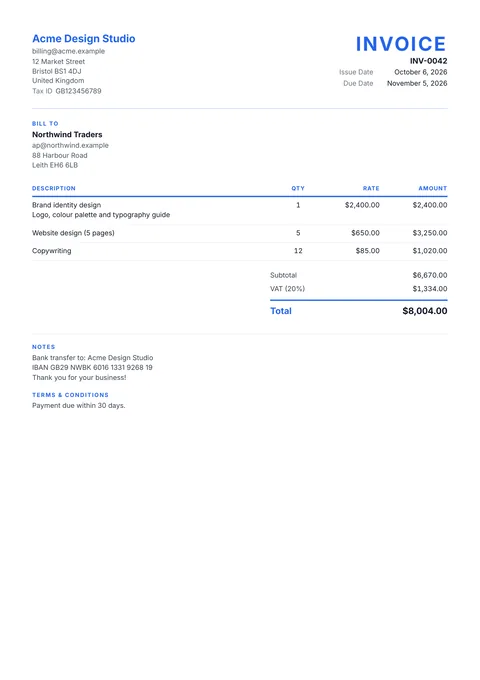
Classic
Clean and balanced, a coloured title and rules.
Best for: Any business. The safe, familiar layout clients expect.
Use this template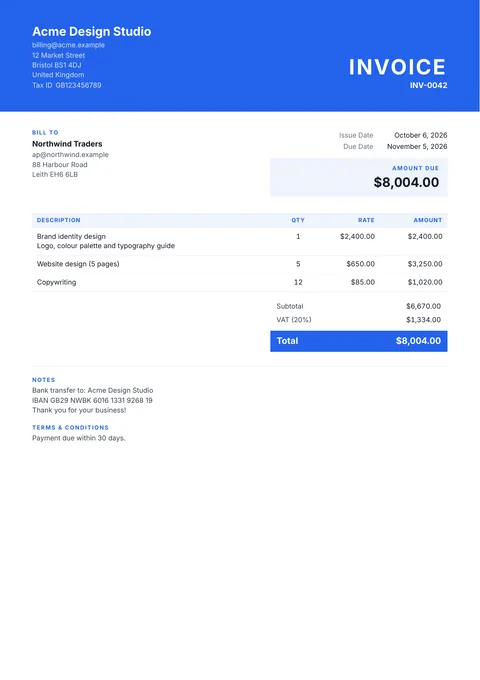
Modern
A full-width colour band across the top.
Best for: Agencies, studios and tech services that want a confident first page.
Use this template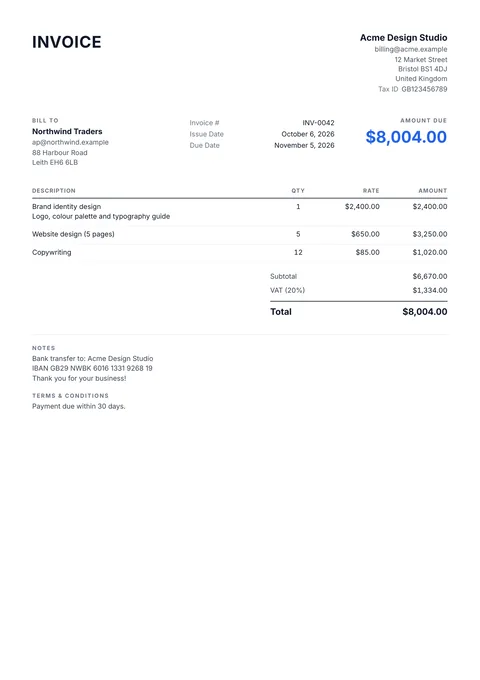
Minimal
Quiet black and grey, the amount due up front.
Best for: Consultants and freelancers who like a quiet, Stripe-style invoice.
Use this template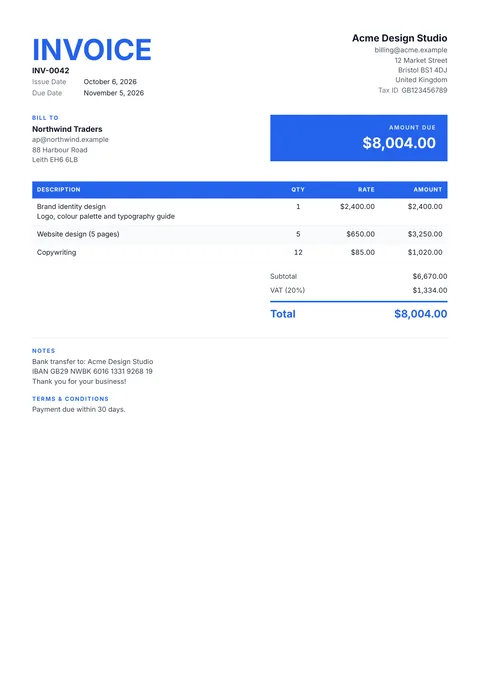
Bold
A big title and a solid colour table header.
Best for: Trades and retail: a big title and the amount due impossible to miss.
Use this template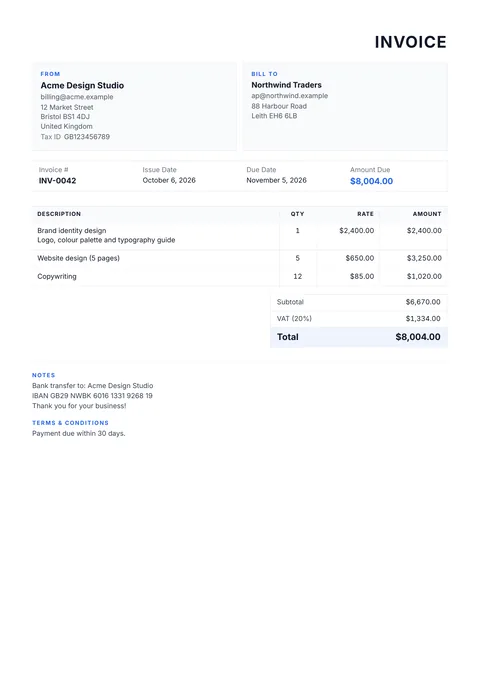
Corporate
From and Bill to boxes, a ruled table.
Best for: B2B work where accounts payable wants From, Bill to and the details boxed.
Use this template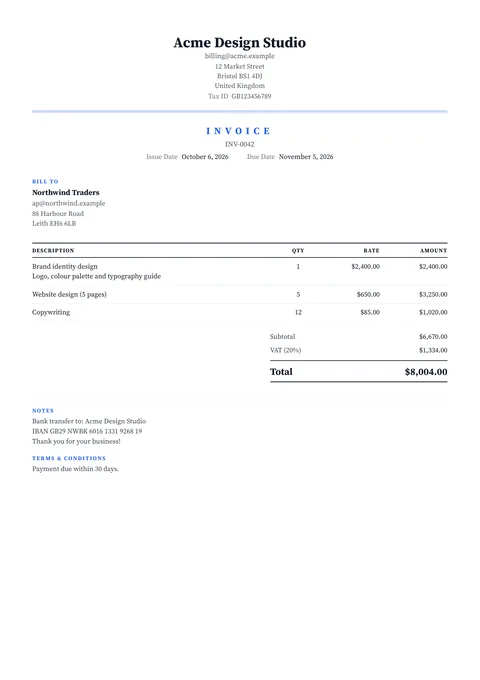
Elegant
Serif type, centred header, fine double rules.
Best for: Hospitality, legal, events and creative work: serif type, centred header.
Use this template
What Makes an Invoice Template Professional
Everything a client needs to pay
Your business and the client's details, a unique invoice number, the issue and due dates, itemized lines with quantity and rate, tax shown separately, and a clear total. Every template prints all of it, in the order accounts payable teams look for it.
Totals that can't be wrong
Spreadsheet templates break when a row is added or a formula is overwritten. Here the subtotal, discounts, tax and total are calculated as you type, and the subtotal only appears when a discount or tax sits between it and the total.
Your brand, not the template's
Add your logo, pick any accent colour, choose sans or serif type and set the text size. A light accent is automatically darkened wherever it's used for text, so labels stay readable in print.
The amount due, up front
Modern, Minimal, Bold and Corporate print the amount due near the top of the page, the way Stripe and most modern billing tools do. It's the number your client is looking for, so they find it in a second.
How to Use an Invoice Template
Pick a template
Choose one of the six designs above. You can switch any time in the Design tab without losing what you've typed.
Fill it in on the page
Click any field on the invoice and type: your details, the client, line items, tax and notes. Remove anything you don't need with the bin.
Download the PDF
Download a print-ready PDF with no watermark, then email or text it to your client yourself. Your draft stays in your browser for next time.
Every Template Includes
Choosing the Right Template
Billing another company? Use Corporate
Accounts payable teams scan for the supplier, the bill-to company, the invoice number and the due date. Corporate puts the two parties in labelled boxes and the number, dates and amount due in one ruled strip, which makes it quick to process.
Want to be paid on time? Put the amount due first
Minimal, Modern and Bold print the amount due at the top of the page. Pair it with clear payment terms (Net 15 or Net 30) and payment details in the notes so nothing stands between the client and paying.
Selling a premium service? Try Elegant
Serif type, a centred header and fine double rules read as considered and high-end. It suits hospitality, events, legal and creative studios, where the invoice is part of the experience.
Keep the same template for every invoice
Clients recognise your invoices faster when they always look the same. With a free account you can save your look (template, colour, logo, signature) and every new invoice starts in it.
Remove what you don't use
Billing a fixed fee? Remove the Qty and Rate columns so only descriptions and amounts show. Not using due dates? Remove that row. A shorter invoice is easier to read and to pay.
Frequently Asked Questions
Yes. All six templates are free to use as many times as you like, with no signup, no watermark and no trial. You fill the template in on the page and download a PDF. A free account is optional; it saves your clients and lets you keep your look as your own template.
Invoita produces PDF invoices, which is the format clients and accounting teams expect because it looks the same on every device and can't be edited by accident. Instead of downloading a blank Word or Excel file and fixing its formulas, you fill the template in online, where totals, tax and discounts are calculated for you, and download the finished PDF.
Classic suits almost anyone. If you bill other companies, Corporate's From and Bill to boxes and ruled table match what accounts payable departments are used to. If you want the client to see the amount due first, use Minimal, Modern or Bold, which all print the amount due near the top.
Yes. Every template takes your logo and any accent colour, and you can switch between a sans-serif and a serif font, make the text bigger or smaller, and set the heading size separately. Changing template keeps everything you've typed, so you can try all six on your own invoice.
Yes. Click any part of the invoice, such as the title, the invoice number, a date, the Qty or Rate column, or a heading, and press the bin to take it off. Removed parts are listed in the Design tab so you can bring them back. You can also rename labels, for example INVOICE to RECEIPT or Qty to Hours.
Yes. Rename the title to RECEIPT, ESTIMATE, QUOTE or BILL with one click, and the same six designs work for every document. Page sizes are A4, US Letter, A5 and Legal.
More free invoice tools
Invoice generators by industry
- Freelancer invoice
- Construction invoice
- Plumbing invoice
- Electrician invoice
- Handyman invoice
- Landscaping invoice
- Cleaning invoice
- Auto repair invoice
- Trucking invoice
- Consulting invoice
- Graphic design invoice
- Web design invoice
- Photography invoice
- Tutoring invoice
- Medical invoice
- Hotel invoice
- HVAC invoice
- Roofing invoice
- Painting invoice
- Pressure washing invoice
- Pest control invoice
- Moving company invoice
- Catering invoice
- DJ invoice
Free tools
Start From a Professional Template
Pick a design, type on the page and download your PDF. Free, no signup, no watermark.